

Routes
Create routes to separate transactional, broadcast, and inbound email behavior within a project.
What are routes?
Routes control how Lettermint processes email in a project. Choose a route type for each email workflow.
Route types
Transactional routes
Use transactional routes for one-to-one email that a user action triggers.
Use cases:
- Password reset emails
- Order confirmations
- Account verification emails
- Shipping notifications
- Two-factor authentication codes
Features:
- Priority delivery
- Dedicated infrastructure not shared with marketing campaigns
Best practices:
- Use a dedicated transactional route for critical emails
- Never include marketing content in transactional emails
- Monitor delivery rates closely
Broadcast routes
Use broadcast routes for email campaigns sent to multiple recipients.
Use cases:
- Marketing newsletters
- Product announcements
- Weekly digests
- Promotional campaigns
- Community updates
Features:
- Built-in unsubscribe handling
- Hosted unsubscribe pages (can be disabled on higher plans)
- Bulk sending controls
The hosted unsubscribe feature automatically adds an unsubscribe link to broadcast emails and manages the unsubscribe page. Disabling this requires you to handle unsubscribes yourself. To change this setting, contact support. This option is only granted to trusted senders.
Inbound routes
Use inbound routes to receive email and process it through webhooks.
Use cases:
- Support ticket systems
- Email-to-task conversions
- Reply tracking
- Email parsing and automation
- Customer feedback collection
Features:
- Unique email address per route
- Custom domain support with MX records
- Configurable spam filtering
- Full email parsing (headers, body, attachments)
- Webhook delivery with complete email data
- Subaddress support (e.g.,
user+tag@example.com)
Inbound routes are available on Starter plans and above. See the Inbound Mail guide for detailed setup instructions.
Default routes
Each project has a default route that is used when you send emails without specifying a route in your API request. This simplifies your integration by allowing you to omit the route parameter for common use cases.
How default routes work
When you create a new project through the Team API, initial_routes defaults to both. Lettermint creates an outgoing transactional route and a broadcast route, with outgoing set as the default. You can also request only transactional or only broadcast during project creation. You can change the default outbound route at any time via the Team API.
When you send an email:
- With
routeparameter: Uses the specified route - Without
routeparameter: Uses the project's default route
Changing the default route
Use the Team API to set the project's default_route_id:
Setting a route as default automatically removes the default flag from the previous default route.
Requirements:
- The route must belong to the project
- Only transactional and broadcast routes can be set as default
- Inbound routes cannot be set as default (they receive emails, not send them)
Viewing the default route
When listing routes, check the is_default field on each route:
Code
The default route ID is also included in project API responses as default_route_id.
Route constraints
Routes have certain constraints to maintain project integrity:
- Route type is immutable: Once created, a route's type (transactional, broadcast, inbound) cannot be changed. Create a new route if you need a different type.
- Cannot delete the default route: You must set another route as default before deleting the current default route.
- Cannot delete the last route: Every project must have at least one route. You cannot delete a project's only remaining route.
- Protected slug: The
outgoingslug is reserved for the default transactional route created with new projects and cannot be used for other routes.
Managing routes
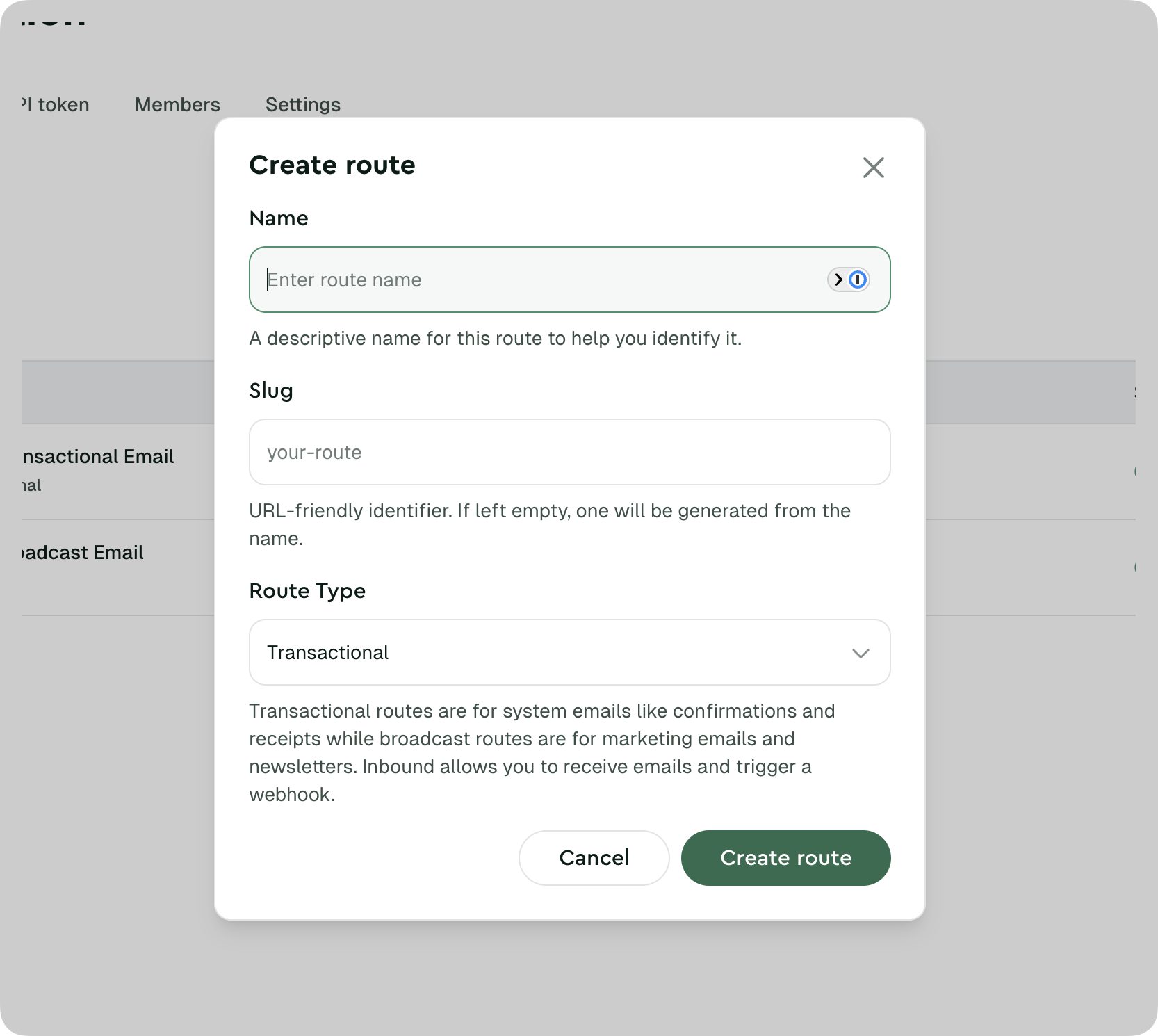
Creating a route
- Navigate to your project in the dashboard
- Go to the Routes section
- Click Create Route
- Choose your route type
- Configure route settings
- Save your route
Route settings
Different route types have different available settings:
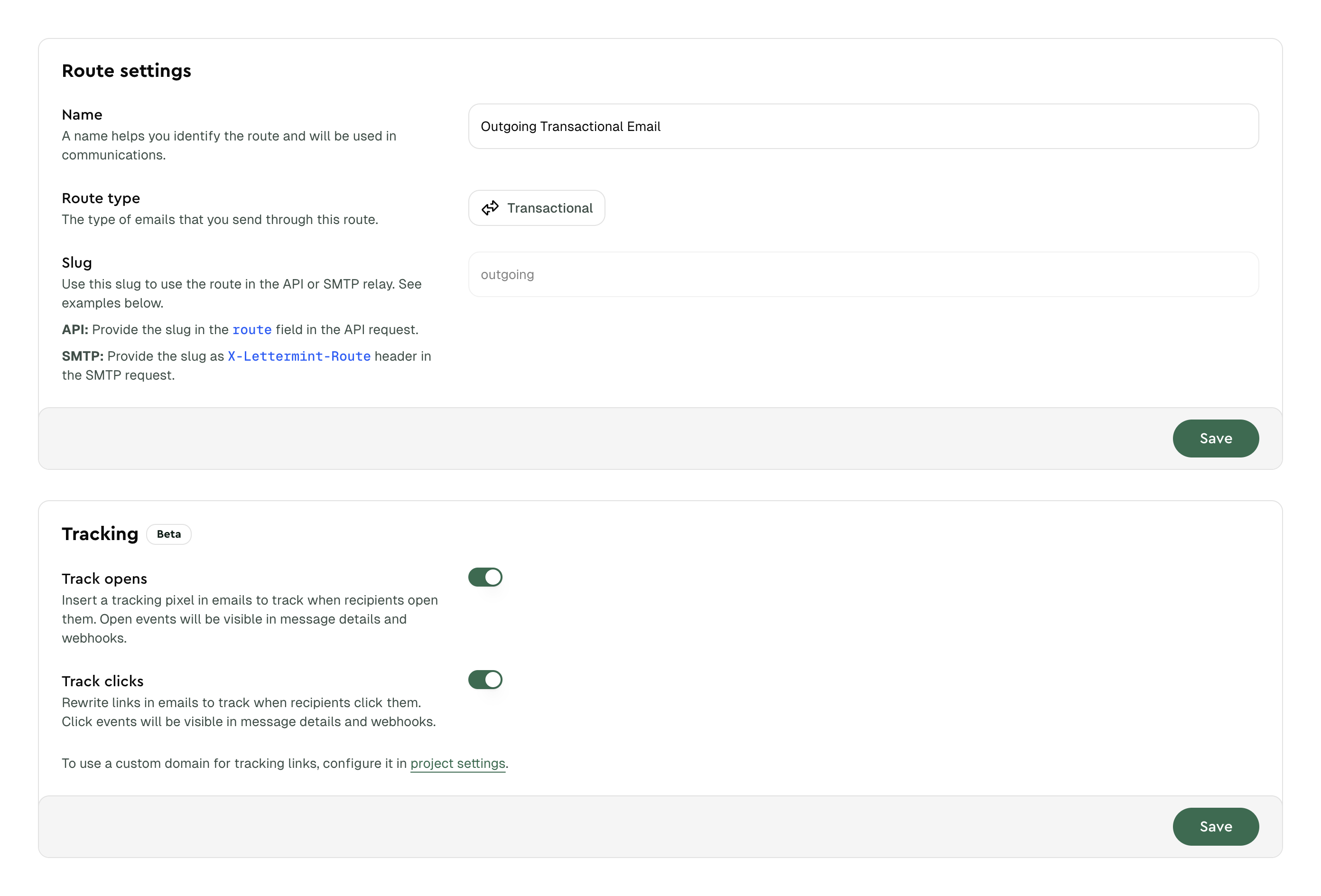
All Routes:
- Name and description
- Webhook configuration
- Suppression list management
Transactional & Broadcast Routes:
- Open tracking - Track when recipients open emails
- Click tracking - Track when recipients click links
- TLS - Choose opportunistic or enforced encryption for outbound delivery
- Plaintext fallback generation - Generate a plaintext version for HTML-only outbound emails
- Disposable recipient suppression - Skip recipients that use a disposable email domain
Email tracking is available on paid plans. See the Tracking documentation for setup details and bot detection information.
See the TLS documentation for the delivery tradeoff, per-email overrides, and enforced-failure behavior.
Broadcast Routes:
- Hosted unsubscribe settings
Inbound Routes:
- Spam threshold configuration
- Attachment delivery mode (inline or URL)
- Custom domain setup
See Spam filtering and Attachments and raw email for inbound-specific settings.
Plaintext fallback generation
Transactional and broadcast routes generate a plaintext fallback when you send an HTML-only email. This improves compatibility with inboxes and clients that prefer or require a text part.
If your application already provides a plaintext variant, Lettermint keeps it exactly as supplied and does not replace it with a generated version.
Use the route update method shown in TLS with this payload to enable generated plaintext fallbacks:
Code
Set generate_plaintext_fallback to false to stop generating the fallback.
Disposable recipient suppression
You can enable disposable recipient suppression for transactional and broadcast routes. Lettermint checks the domains of all To, Cc, and Bcc recipients before delivery.
When a domain matches the disposable email domain list:
- Lettermint skips that recipient for the current message.
- Other recipients in the message still receive the email.
- Lettermint does not add the recipient to a team, project, or route suppression list.
- Lettermint does not start a delivery attempt when all recipients match.
The setting is disabled by default. Use the route update method shown in TLS with this payload to enable it:
Code
Lettermint uses exact domain matches. It does not use DNS or MX records to find related domains. Disable the setting to stop the check for new messages.
The disposable email domain list comes from the disposable-email-domains project and is licensed under the MIT License.
Copyright (c) 2017 Andrei Simionescu
Copyright (c) 2017 Stefan Meinecke, greenSec GmbH
Webhooks for routes
A route can use a route webhook, a project webhook, or a team webhook. One webhook can target multiple projects or routes. It uses one URL and one signing secret for all selected targets.
- Transactional/Broadcast: Receive
message.sent,message.delivered,message.auto_replied,message.hard_bounced,message.soft_bounced, etc. - Inbound: Receive
message.inboundevents with full email content
See the Webhooks documentation for configuration details.
Suppression lists
Lettermint checks team, project, and route suppressions before it sends a message. If one recipient is suppressed, Lettermint skips that recipient and sends to the other recipients.
| Scope | Applies to | Use case |
|---|---|---|
| Route | One route | Complaints, unsubscribes, and route-specific manual blocks |
| Project | All routes in one project | Manual blocks for one application or environment |
| Team | All projects and routes | Automatic hard bounce blocks and team-wide manual blocks |
A suppression can block all mail or broadcast mail only. Complaints and unsubscribes stay on the source route. On a broadcast route, they block broadcast mail. On a transactional route, they block all mail on that route. Qualifying hard bounces block all mail across the team.
See Suppressions for the automatic bounce classifications, scope rules, mail categories, API examples, and removal rules.
Choosing the right route type
Transactional
- User triggered
- Time-sensitive
- Mission-critical
- Account-related
Broadcast
- Marketing content
- Multiple recipients
- Campaigns
- Newsletters
Inbound
- Receiving emails
- Support systems
- Reply processing
- Email automation
Don't mix email types! Using a transactional route for marketing or vice versa can harm deliverability and violate anti-spam regulations.
Next steps
- Set up Inbound Mail - Configure inbound email routing
- Configure Webhooks - Receive delivery events
- Manage Domains - Set up verified sending domains
- Enable Email Tracking - Track opens and clicks on your routes
- Configure TLS - Choose how outbound deliveries use transport encryption