

Magento 2
Use the official Lettermint Magento 2 module to route existing store email through Lettermint without changing Magento templates. See Integrations for other packages.
Requirements
Before you start you need:
- A Magento 2.4 store (Magento Open Source or Adobe Commerce) running on PHP 8.2 or newer
- Command-line access to run Composer and
bin/magento - A Lettermint account with a verified sending domain
- A Project API token from your project settings
If your domain is not verified yet, follow the domain setup guide first so your store's email reaches the inbox instead of the spam folder.
1. Installation
Install the package via Composer:
Code
After installation, run the Magento setup commands:
Code
2. Configuration
Create a Project API token in project settings before you configure the module.
Finding the settings
Navigate to Stores → Settings → Configuration. Then look for Lettermint in the sidebar.
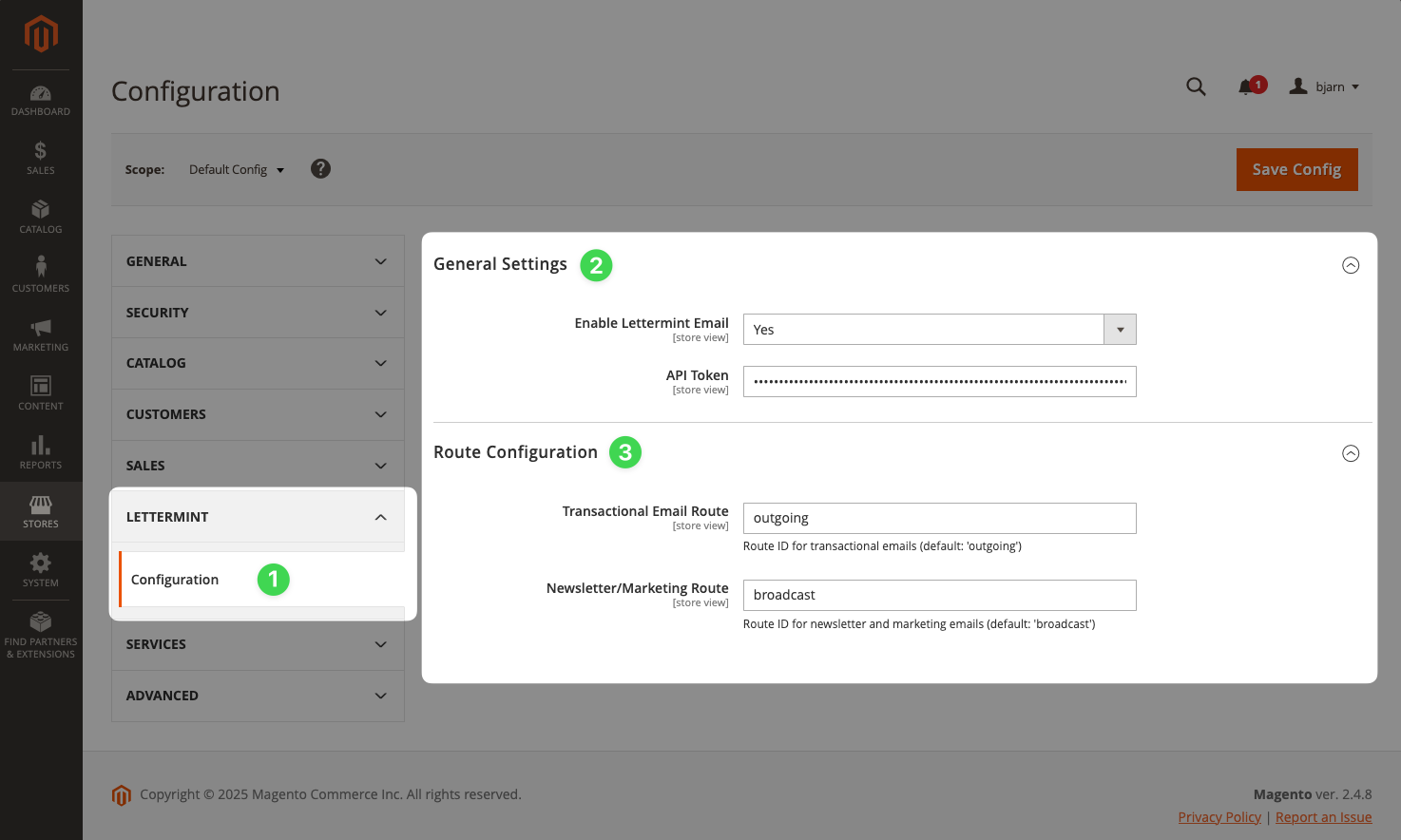
General settings
- Set Enable Lettermint Email to Yes
- Enter your project's Project API token in the API Token field
- Save the configuration
Route configuration (optional)
Configure which routes handle different email types:
- Transactional Email Route: Used for system emails (password resets, order confirmations, invoices, track & trace updates)
- Newsletter/Marketing Route: Used for newsletter emails sent via Marketing → Newsletter Queue
The defaults work for most setups. Only configure custom routes if you need to separate email traffic for analytics or deliverability purposes.
3. Sending emails
Automatic transactional emails
Once configured, all Magento transactional emails automatically route through Lettermint:
- Order confirmations
- Shipping notifications
- Password reset emails
- Customer account emails
- Invoice and credit memo emails
The module routes these messages after you save the configuration. You do not need to change the Magento email templates.
Testing your setup
Verify the integration works by triggering a test email:
- Go to Marketing → Communications → Email Templates
- Create or edit a template
- Click Preview Template and send a test email
Or trigger a password reset from the customer login page to test transactional emails.
Programmatic emails
Send emails programmatically using Magento's transport builder:
Code
Adding custom headers
Add Lettermint headers for metadata and tags using a plugin:
Code
Register the plugin in etc/di.xml:
Code
Metadata is included in webhook payloads but not added to the actual email headers. Use it for tracking and analytics purposes.
Keep deliverability high
Order confirmations and shipping updates only help when they reach the inbox. Verify your sending domain and publish the DNS records Lettermint provides:
- Verify your sending domain with DKIM
- Configure SPF so receivers trust your store's mail
Send from an address on your verified domain, such as orders@yourstore.com, rather than a generic free mailbox, so your store builds its own sending reputation.
Track delivery, opens, and bounces
To see what happens to your store's email after it leaves Magento, use Lettermint's platform features alongside the module:
- Email tracking records opens and clicks, with bot filtering so your metrics stay accurate.
- Webhooks push delivery, bounce, and complaint events to your systems in real time, so you can flag failed order emails or suppress bad addresses.
- Test addresses let you trigger a hard or soft bounce on demand while you build and verify your webhook handler.
Use the X-LM-Metadata-order_id header shown above to attach the order number to each message, so every delivery or bounce event maps straight back to the order in Magento.
4. Troubleshooting
Emails not sending
- Verify Enable Lettermint Email is set to Yes
- Check your Project API token is correct
- Review logs in
var/log/system.log - Ensure the module is enabled:
bin/magento module:status Lettermint_Email
Clear cache after changes
After configuration changes:
Code
FAQ
Does the module work with Magento Open Source and Adobe Commerce?
Yes. The module targets Magento 2.4 and installs on both Magento Open Source and Adobe Commerce, since both are built on the same magento/framework.
Do I need to change my email templates or code?
No. Once you enable the module and enter your API token, Magento's existing transactional emails, including order confirmations, invoices, and shipping notifications, route through Lettermint automatically. Custom code is only needed if you want to add metadata, tags, or a specific route to programmatic emails.
Is Lettermint email GDPR compliant and EU-hosted?
Yes. Lettermint runs exclusively on European infrastructure and processes email in line with GDPR, so your store's transactional mail and customer data stay inside the EU.
Can I send newsletters and transactional email through different routes?
Yes. In the module settings you can set a separate route for newsletter and marketing email (sent via Magento's Newsletter Queue) and for transactional email, so you can keep the two streams apart for analytics and deliverability.
How do I track bounces for order emails?
Enable tracking on your route and subscribe to webhooks to receive delivery and bounce events. Attach the order ID as metadata, as shown in the custom headers example, so each event maps back to the order. Use the test addresses to simulate bounces while you build your handler.
Next steps
Tags
Organize and filter emails with tags.
Tracking
Track opens, clicks, and deliverability.
Webhooks
Receive delivery events through webhooks.
SMTP Alternative
Send via SMTP instead of the API.
GitHub Repository
Find the complete source code, report issues, or contribute on GitHub.