

SMTP
Use the Lettermint SMTP relay when your application or device supports SMTP. This guide lists the connection settings, authentication rules, and supported message headers.
Enable SMTP
First, enable SMTP for the project you want to use. You can find this setting under your Projects.
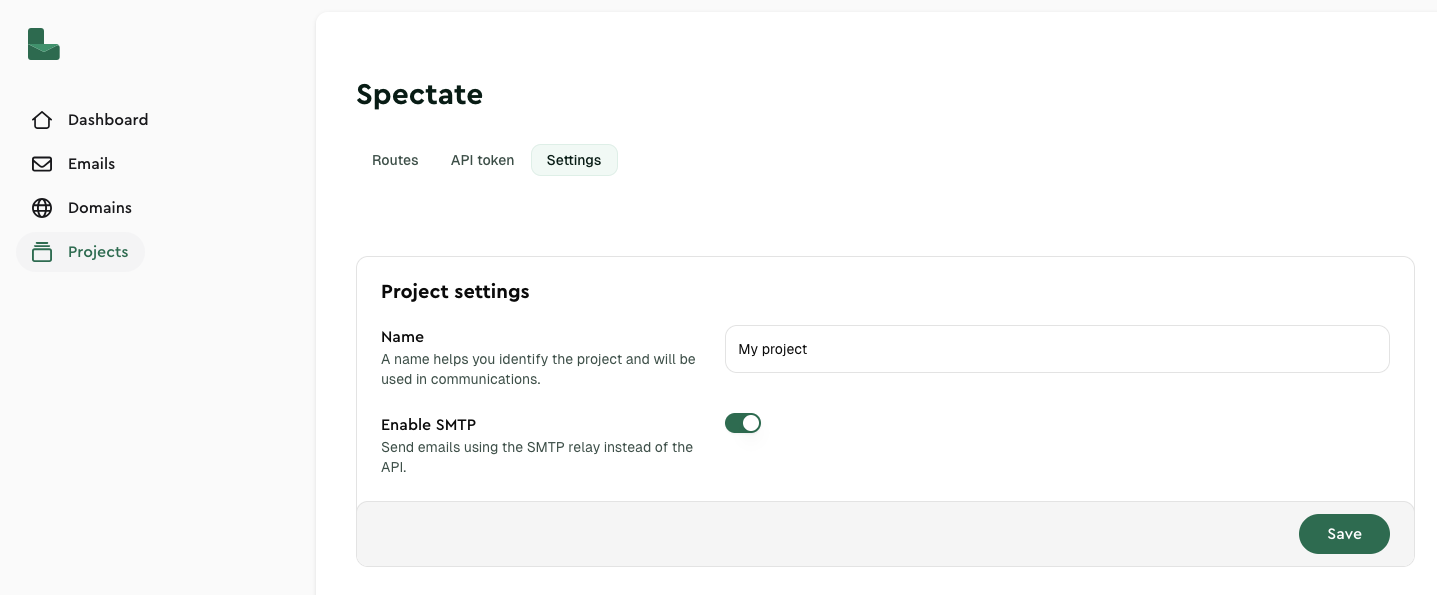
If you want more information about SMTP, read our 'What is SMTP' article.
SMTP configuration
Use these settings to configure your application or email client:
| Setting | Value |
|---|---|
| Host | smtp.lettermint.co |
| Port | 587 (see available ports ) |
| Authentication | PLAIN, LOGIN and CRAM-MD5 are supported |
| Username | lettermint |
| Password | Your Lettermint Project API token |
Available ports
Lettermint supports multiple SMTP ports to accommodate different network environments and security requirements:
| Port | Security | Notes |
|---|---|---|
| 25 | STARTTLS (optional encryption upgrade) | Not recommended, blocked by many ISPs and cloud providers |
| 587 | STARTTLS (encryption upgrade) | Recommended as alternative if Implicit TLS is not supported |
| 465 | Implicit TLS (SMTPS, encrypted from connection) | Recommended for best security |
| 2525 | STARTTLS (encryption upgrade) | Alternative to port 25 |
| 2465 | STARTTLS (encryption upgrade) | Alternative to port 465 |
| 2587 | STARTTLS (encryption upgrade) | Alternative to port 587 |
Understanding TLS options
- STARTTLS: Connection starts unencrypted and upgrades to TLS encryption. Used on ports 25, 587, 2525, 2465 and 2587.
- SMTPS: Connection is encrypted from the start. Used on port 465.
If you are not sure which port to use, start with port 587. This port is widely accepted and gives good security through STARTTLS.
Port 25 is often blocked by ISPs and cloud providers to prevent spam. We recommend using alternative ports whenever possible.
Authentication
Authentication is always required when using Lettermint's SMTP service:
- Use
lettermintas username and your Project API token as password - Always use TLS encryption (either STARTTLS or Implicit TLS) to protect your credentials
- Your Project API token can be created in your dashboard under Projects → [Your Project] → API Tokens
If the Project API token has an IP allowlist, SMTP connections must originate from an allowed IP address or CIDR range.
Store your Project API token in an environment variable (e.g., LETTERMINT_PROJECT_TOKEN) rather than hardcoding it in your application code.
Custom headers
X-LM-Scheduled-At
Growth and Pro teams can schedule an authenticated outbound SMTP message with X-LM-Scheduled-At.
Use an ISO 8601 value with Z or an explicit offset:
Code
You can also use an English value:
Code
See Scheduled email delivery for time formats, limits, release states, lifecycle actions, plan behavior, and SMTP error responses.
X-Lettermint-Route
You can control email routing by including the X-Lettermint-Route header in your SMTP messages. This header accepts a route's slug to specify which route should handle the email.
Code
This is useful when you have multiple routes configured in your project and want to explicitly specify which route should process a particular email. If this header is not provided, the email is routed through the current default outbound route for the project.
X-LM-Preserve-Message-ID
Lettermint replaces submitted Message-ID fields by default. If your application stores its own RFC Message-ID for reply threading, opt in to preserving it for a single email:
Code
The preservation header accepts true, false, 1, or 0 case-insensitively and is removed before delivery. When preservation is enabled, the submitted Message-ID must contain exactly one valid, angle-bracketed RFC identifier. Missing identifiers receive a Lettermint-generated value; malformed or duplicate identifiers are rejected.
The RFC Message-ID delivered with the email is separate from Lettermint's internal message_id. API responses and webhook events continue to use the Lettermint UUID for delivery, bounce, complaint, and auto-reply correlation.
X-LM-Override-TLS
Override the selected route's TLS delivery policy for one email:
Code
The header accepts enforced or opportunistic case-insensitively. Surrounding whitespace is ignored. The override takes precedence over the selected transactional or broadcast route's TLS setting, so opportunistic can also relax an enforced route for one email.
Invalid values and duplicate X-LM-Override-TLS fields are rejected. Lettermint consumes the header before delivery, so recipients do not receive it. See TLS for policy behavior, precedence, and failure handling.
X-LM-Tag (or X-Tag)
Use X-LM-Tag for the existing singular tag.
Code
The singular tag can have a maximum of 255 characters. It can contain letters, numbers, underscores, hyphens, and spaces. Its pattern is ^[a-zA-Z0-9_-]+(?:\s[a-zA-Z0-9_-]+)*$.
Valid examples:
newsletterorder-confirmationPassword ResetInvoice_2024
You can also use X-Tag for compatibility with Symfony Mailer. X-LM-Tag takes precedence when both headers are present.
X-LM-Tags
Use X-LM-Tags for structured name and value pairs:
Code
You can repeat the header. Lettermint merges all pairs before it validates the message:
Code
These rules apply:
- Separate pairs with a comma. You can add spaces after the comma.
- Do not add spaces before a comma.
- Do not use quotes or percent encoding.
- Each header value can have a maximum of 900 ASCII bytes.
- A name can have 1 to 32 ASCII letters, digits, underscores, or hyphens.
- A value can have 1 to 64 ASCII letters, digits, underscores, or hyphens.
- Names must be unique across all
X-LM-Tagsheaders. - Names and values are case-sensitive.
- Names that start with
__lettermint, in any letter case, are not permitted. __lettermint_tagis not permitted inX-LM-Tags. Lettermint creates it only from the singular tag.- The combined limit is 20 tags. The singular tag uses one place in this limit.
Lettermint rejects a malformed segment, an incomplete pair, a duplicate name, a reserved name, an oversized header, or a request over the combined limit. It does not ignore invalid segments.
X-LM-Tag and X-LM-Tags are filter controls. X-LM-Metadata-* headers contain internal IDs and other message context. Use metadata for unique or high-volume values.
Lettermint consumes all these control headers before delivery. Recipients do not receive them.
Learn more about organizing emails with tags in the Tags documentation.
X-LM-Metadata-* (or X-Metadata-*)
Attach custom metadata to your emails for tracking and webhook payloads. Metadata headers use a prefix pattern where anything after X-LM-Metadata- becomes the metadata key.
Code
Key features:
- Keys preserve their casing (e.g.,
X-LM-Metadata-UserID→{"UserID": "value"}) - Values are stored as strings
- Metadata is included in webhook payloads but not sent to recipients
- Useful for correlating emails with your application data
Alternative prefix: You can also use X-Metadata- for compatibility with Symfony Mailer, but X-LM-Metadata- takes precedence if both are present for the same key.
Rate limits
SMTP sends use the same project-level sending pipeline as the Sending API. Send endpoints are not throttled by a fixed per-minute API rate limit, but plan quota, spend limits, account verification, reputation, and abuse controls still apply.
Testing your configuration
Test your SMTP setup with a simple command-line tool:
Code
For language-specific examples and application configurations, please refer to our dedicated guides in the documentation.