

Return-Path and SPF
Use this page to understand how Lettermint uses the Return-Path domain for bounce handling and SPF authentication.
Overview
The Return-Path domain has two functions in email delivery:
- Bounce handling: Receives delivery failure notifications and spam complaints
- SPF authentication: Identifies which servers are authorized to send on your domain's behalf
The Return-Path is the envelope sender: the address mail servers use for routing and authentication, separate from the visible "From" address your recipients see.
The Return-Path is also known as the Envelope Sender, MAIL FROM, or Bounce Address. These terms are interchangeable.
What is SPF?
SPF (Sender Policy Framework) is a DNS-based authentication protocol that specifies which mail servers can send email for a domain. Receiving servers check SPF records to verify the sending server is authorized.
An SPF pass means that the sending server is authorized for the Return-Path domain. DMARC also checks whether that domain aligns with the domain in the visible From address. An SPF pass does not prove SPF alignment.
For a deeper explanation of SPF authentication, read our What is SPF knowledge base article.
How Lettermint handles SPF
Lettermint uses a CNAME-based approach for SPF, which means you don't need to create or maintain an SPF record yourself.
Here's how it works:
- You add a CNAME record for
lm-bounces.yourdomain.com - The CNAME points to Lettermint's infrastructure (
bounces.lmta.net) - We maintain the SPF record at that target domain
- When receiving servers look up SPF, they follow the CNAME and find our valid SPF record
This approach ensures your SPF configuration stays current without manual updates.
SPF alignment with DMARC
Lettermint uses a subdomain for the Return-Path. For example, email from
sender@example.com uses lm-bounces.example.com for bounce handling. Email
from sender@mail.example.com uses lm-bounces.mail.example.com.
The aspf tag in your DMARC record controls SPF alignment:
| Setting | Requirement | example.com with lm-bounces.example.com |
|---|---|---|
aspf=s | The domains must match exactly. | SPF alignment fails. |
aspf=r | The domains must share the same organizational domain. | SPF alignment passes. |
No aspf tag | Relaxed alignment applies by default. | SPF alignment passes. |
The receiving server compares the Return-Path domain, not the CNAME target
bounces.lmta.net, with the visible From domain.
DMARC passes when either SPF or DKIM passes authentication and alignment.
Thus, aligned DKIM can pass DMARC even when strict SPF alignment fails. The
adkim tag controls DKIM alignment separately. The p tag controls the policy
for messages that fail DMARC. See RFC 9989.
Fix a strict SPF alignment mismatch
Lettermint blocks first domain verification when strict SPF alignment does not match its Return-Path. This is a Lettermint setup requirement. It does not mean that every message with this setting fails DMARC.
- Open the domain's DNS page in Lettermint.
- Find the DMARC record named in the SPF alignment notice.
- At your DNS provider, change only
aspf=stoaspf=rin that record. - Keep the other tags and their values unchanged.
- Return to Lettermint and select Verify or Verify records.
For example:
Code
An inherited DMARC policy comes from a parent domain. Changing that record can affect other senders. If the parent must keep strict SPF alignment, review the exact child policy guidance.
For a domain that passed verification before, Lettermint shows the mismatch but does not stop sending because of it. Other DNS verification failures can still stop sending. The notice clears when a DNS check finds the corrected record.
Domain Connect keeps your existing DMARC policy. Update its alignment setting manually when the notice appears. Adding SPF to your root domain or changing the Return-Path CNAME target does not fix this mismatch.
Configuration
To set up your Return-Path for SPF:
- Navigate to Domains in your dashboard
- Select your domain or add a new one
- Locate the Return-Path CNAME record in the DNS configuration section
- Add the record to your DNS provider
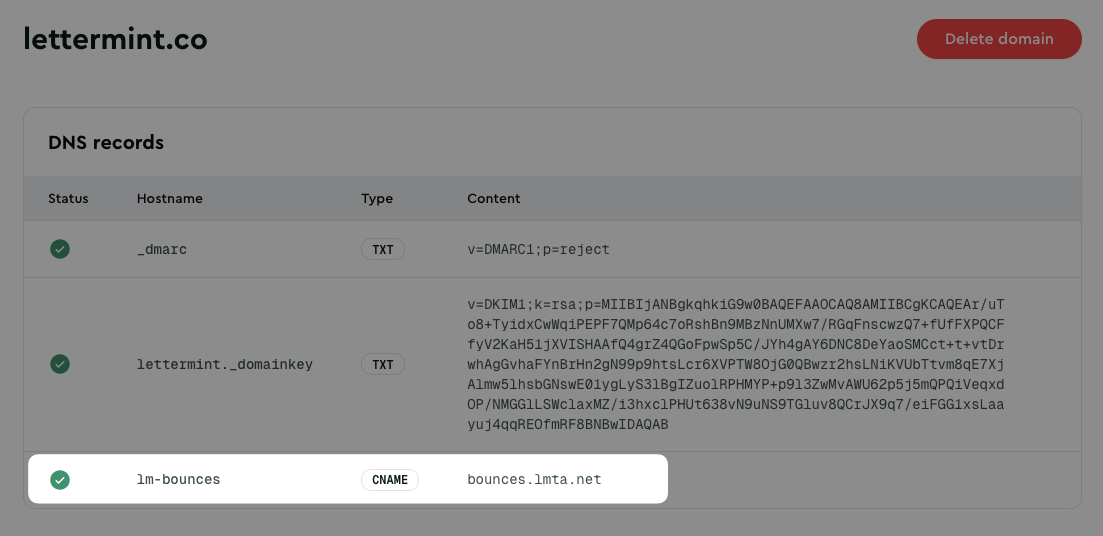
The CNAME target points to Lettermint's bounce handling infrastructure, which includes our SPF record:
Code
Verification
After adding the CNAME record, verify it's configured correctly:
Code
Expected output:
Code
To verify the SPF record at the target:
Code
Expected output:
Code
Troubleshooting
CNAME not resolving
If dig returns no results:
- Wait for propagation: DNS changes can take up to 48 hours, though most propagate within minutes
- Check for typos: Ensure the hostname matches exactly what's shown in your dashboard
- Verify the record type: Make sure you created a CNAME record, not a TXT or A record
Conflicting records
CNAME records cannot coexist with other record types at the same hostname. If you have an existing A, TXT, or MX record at lm-bounces.yourdomain.com, remove it before adding the CNAME.
Cloudflare proxy
If using Cloudflare, ensure the proxy status is set to "DNS only" (gray cloud), not "Proxied" (orange cloud). CNAME records used for email authentication should not be proxied.
FAQ
Do I need to add a separate SPF record?
No. Lettermint's CNAME-based approach handles SPF automatically. The Return-Path CNAME points to our infrastructure, where we maintain the SPF record. You don't need to add include:spf.lmta.net to your root domain's SPF record.
I already have an SPF record on my domain. Will this conflict?
No. Since Lettermint uses a subdomain (lm-bounces.yourdomain.com) with a CNAME record, it operates independently from any SPF record on your root domain. Your existing SPF configuration remains unchanged.
Can I use multiple email providers with different SPF records?
Yes. Give each provider a different Return-Path subdomain so the SPF configurations do not conflict.
Next steps
Domain Authentication
Learn about all authentication records (DKIM, DMARC, Return-Path).
Project Limits
Restrict domain usage to specific projects in your team.