# Quickstart
## Prerequisites
Before you start, ensure you have:
- A Lettermint account ([sign up here](https://dash.lettermint.co/register) if needed)
- A [verified sending domain](/platform/domains/introduction)
- Your API token from the Lettermint dashboard
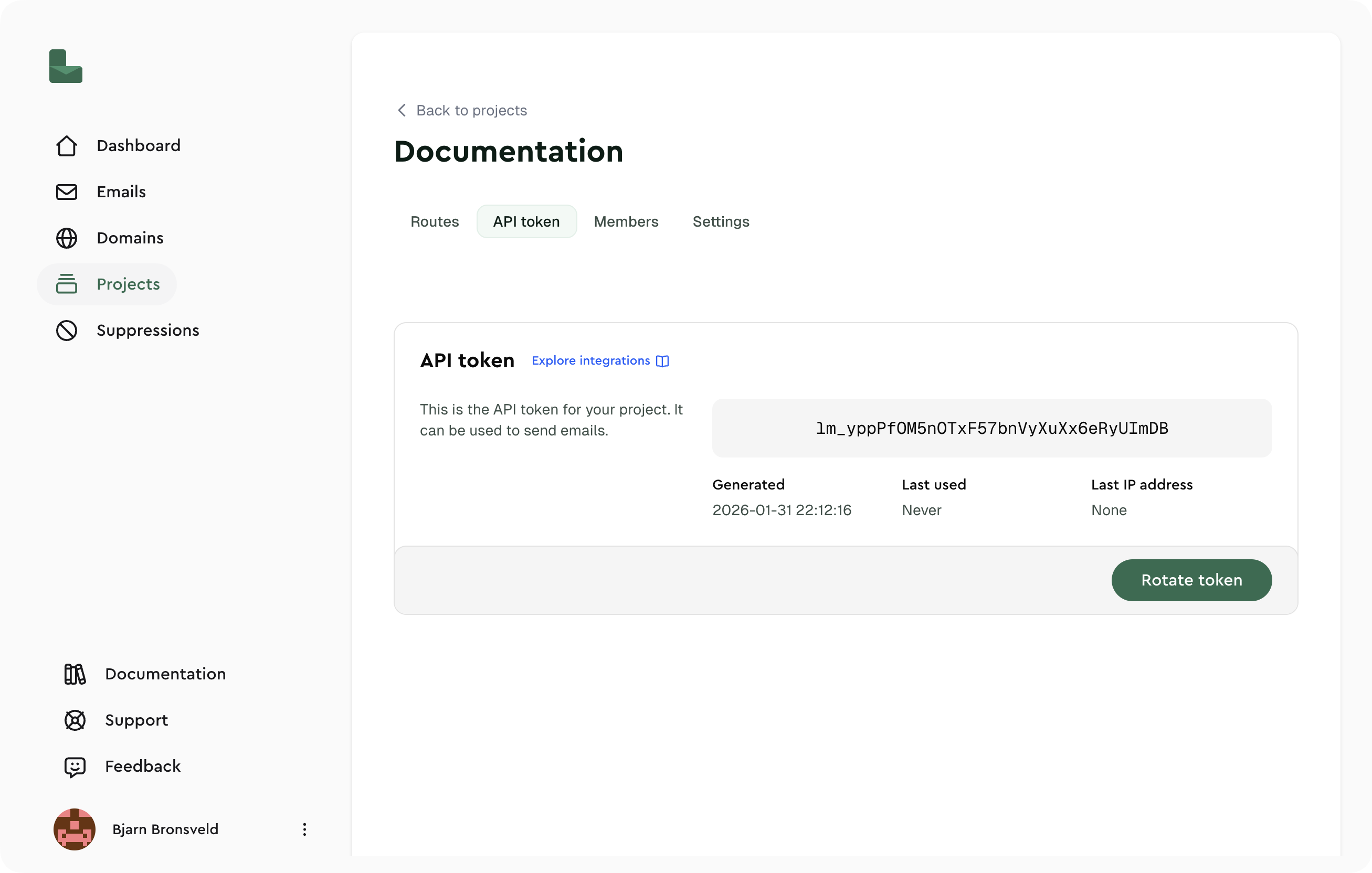
## Step 1: Get Your API Token
1. Log into your [Lettermint dashboard](https://dash.lettermint.co)
2. Navigate to **Projects** → **[Your Project]** → **API Token**
3. Copy your API token
:::warning
Your API token grants full access to send emails on your behalf. Never expose it in client-side code, public repositories, or logs. Store it securely as an environment variable.
:::
 ## Step 2: Send Your First Email
Choose your preferred method:
```typescript title="Node.js"
import { Lettermint } from "lettermint";
const email = Lettermint.email(process.env.LETTERMINT_PROJECT_TOKEN!);
const response = await email
.from("You ")
.to("recipient@example.com")
.subject("Hello from Lettermint!")
.text("This is my first email sent via Lettermint.")
.send();
console.log(`Email sent with ID: ${response.message_id}`);
```
```php title="PHP"
from('You ')
->to('recipient@example.com')
->subject('Hello from Lettermint!')
->text('This is my first email sent via Lettermint.')
->send();
echo "Email sent with ID: " . $response->message_id;
```
```python title="Python"
from lettermint import Lettermint
import os
lettermint = Lettermint(api_token=os.environ["LETTERMINT_PROJECT_TOKEN"])
response = lettermint.email \
.from_("You ") \
.to("recipient@example.com") \
.subject("Hello from Lettermint!") \
.text("This is my first email sent via Lettermint.") \
.send()
print(f"Email sent with ID: {response.message_id}")
```
```bash title="cURL"
curl -X POST "https://api.lettermint.co/v1/send" \
-H "Content-Type: application/json" \
-H "Accept: application/json" \
-H "x-lettermint-token: $LETTERMINT_PROJECT_TOKEN" \
-d '{
"from": "You ",
"to": ["recipient@example.com"],
"subject": "Hello from Lettermint!",
"text": "This is my first email sent via Lettermint."
}'
```
:::tip
Install the SDK first: `npm install lettermint` (Node.js), `composer require lettermint/lettermint-php` (PHP), or `pip install lettermint` (Python).
:::
### Expected Response
A successful request returns a `202 Accepted` response:
```json
{
"message_id": "f47ac10b-58cc-4372-a567-0e02b2c3d479",
"status": "pending"
}
```
:::info
Lettermint does not have a rate limit on its sending API. Send as many emails as you need without worrying about throttling.
:::
## Step 3: Check Your Emails
Go to the [Emails overview](https://dash.lettermint.co/emails) in your dashboard to see your email's delivery status.
## Next Steps
Official libraries for Node.js, PHP, Python, and more.
Complete endpoint documentation with request/response examples.
Receive real-time notifications for delivery events.
Configure DNS records for optimal deliverability.
## Going Further
Once you're comfortable with the basics, explore advanced features:
- [**Idempotency**](/platform/emails/idempotency) — Prevent duplicate sends with idempotency keys
- [**Tags**](/platform/emails/tags) — Organize and filter emails with custom tags
- [**HTML Content**](/api-reference/sending/send-email) — Send rich HTML emails alongside plain text
- [**Tracking**](/platform/emails/tracking/introduction) — Monitor opens and clicks with built-in tracking
Need help? Create a support ticket on your [support page](https://dash.lettermint.co/support/tickets).
## Step 2: Send Your First Email
Choose your preferred method:
```typescript title="Node.js"
import { Lettermint } from "lettermint";
const email = Lettermint.email(process.env.LETTERMINT_PROJECT_TOKEN!);
const response = await email
.from("You ")
.to("recipient@example.com")
.subject("Hello from Lettermint!")
.text("This is my first email sent via Lettermint.")
.send();
console.log(`Email sent with ID: ${response.message_id}`);
```
```php title="PHP"
from('You ')
->to('recipient@example.com')
->subject('Hello from Lettermint!')
->text('This is my first email sent via Lettermint.')
->send();
echo "Email sent with ID: " . $response->message_id;
```
```python title="Python"
from lettermint import Lettermint
import os
lettermint = Lettermint(api_token=os.environ["LETTERMINT_PROJECT_TOKEN"])
response = lettermint.email \
.from_("You ") \
.to("recipient@example.com") \
.subject("Hello from Lettermint!") \
.text("This is my first email sent via Lettermint.") \
.send()
print(f"Email sent with ID: {response.message_id}")
```
```bash title="cURL"
curl -X POST "https://api.lettermint.co/v1/send" \
-H "Content-Type: application/json" \
-H "Accept: application/json" \
-H "x-lettermint-token: $LETTERMINT_PROJECT_TOKEN" \
-d '{
"from": "You ",
"to": ["recipient@example.com"],
"subject": "Hello from Lettermint!",
"text": "This is my first email sent via Lettermint."
}'
```
:::tip
Install the SDK first: `npm install lettermint` (Node.js), `composer require lettermint/lettermint-php` (PHP), or `pip install lettermint` (Python).
:::
### Expected Response
A successful request returns a `202 Accepted` response:
```json
{
"message_id": "f47ac10b-58cc-4372-a567-0e02b2c3d479",
"status": "pending"
}
```
:::info
Lettermint does not have a rate limit on its sending API. Send as many emails as you need without worrying about throttling.
:::
## Step 3: Check Your Emails
Go to the [Emails overview](https://dash.lettermint.co/emails) in your dashboard to see your email's delivery status.
## Next Steps
Official libraries for Node.js, PHP, Python, and more.
Complete endpoint documentation with request/response examples.
Receive real-time notifications for delivery events.
Configure DNS records for optimal deliverability.
## Going Further
Once you're comfortable with the basics, explore advanced features:
- [**Idempotency**](/platform/emails/idempotency) — Prevent duplicate sends with idempotency keys
- [**Tags**](/platform/emails/tags) — Organize and filter emails with custom tags
- [**HTML Content**](/api-reference/sending/send-email) — Send rich HTML emails alongside plain text
- [**Tracking**](/platform/emails/tracking/introduction) — Monitor opens and clicks with built-in tracking
Need help? Create a support ticket on your [support page](https://dash.lettermint.co/support/tickets).