# Introduction
Webhooks are HTTP POST callbacks that Lettermint sends to your URL when events occur. Think of them as "push notifications for your server." Instead of polling our API to check for new bounces or deliveries, you receive instant notifications the moment something happens.
## Why webhooks?
| Approach | How it works | Best for |
|----------|--------------|----------|
| **Polling** | Your server repeatedly asks "any updates?" | Simple setups, low-volume |
| **Webhooks** | Lettermint tells you immediately when something happens | Real-time reactions, high-volume |
Common use cases:
- **Bounce handling:** Remove invalid addresses from your mailing list instantly
- **Delivery confirmation:** Update your database when emails land in inboxes
- **Engagement tracking:** Trigger workflows when recipients open or click
- **Complaint management:** Automatically unsubscribe users who mark you as spam
## Quick start
### 1. Create a webhook in the Dashboard
1. Go to **Dashboard → Your Project → Routes → select a Route → Webhooks**
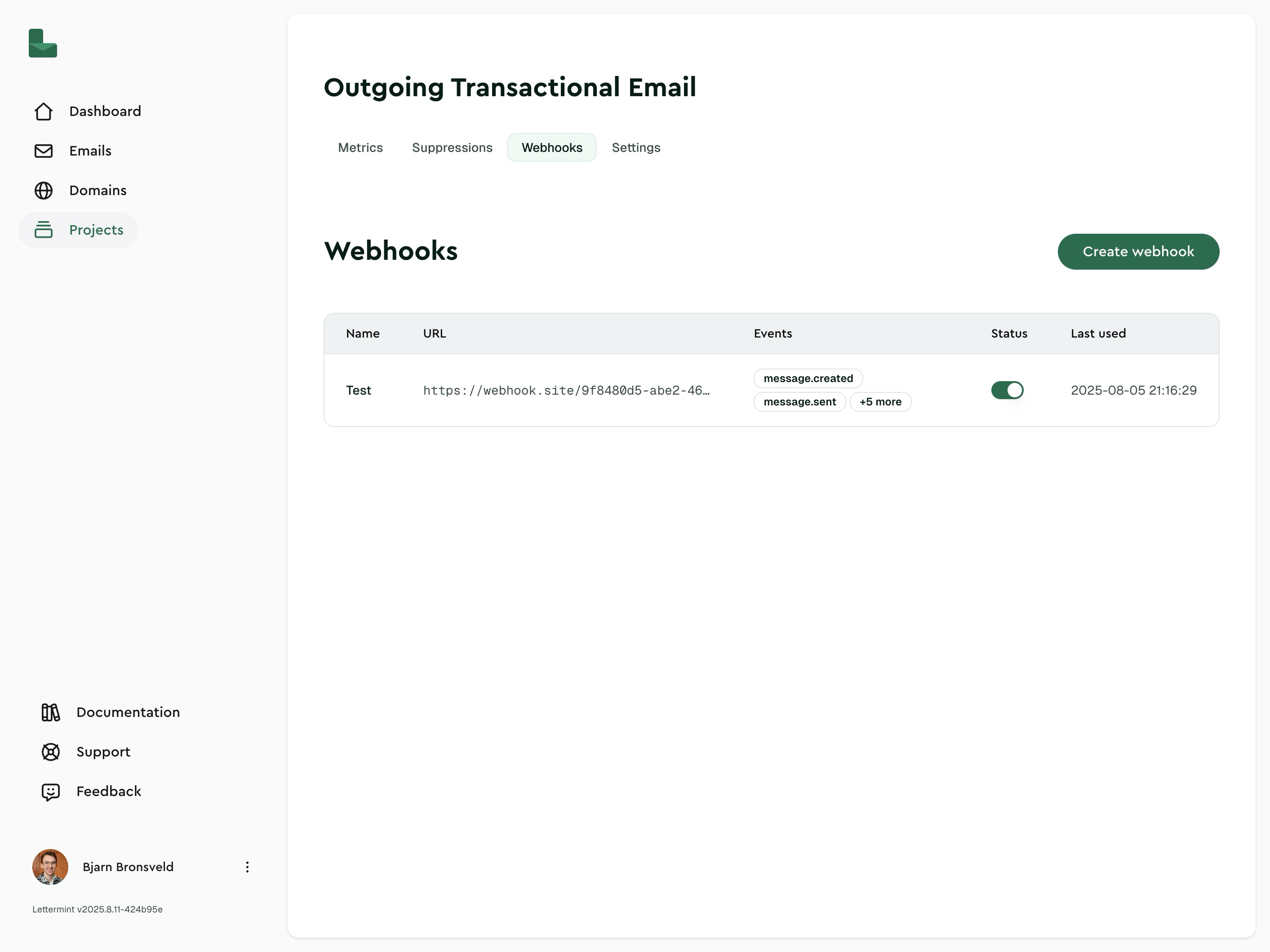 2. Click **Create webhook**
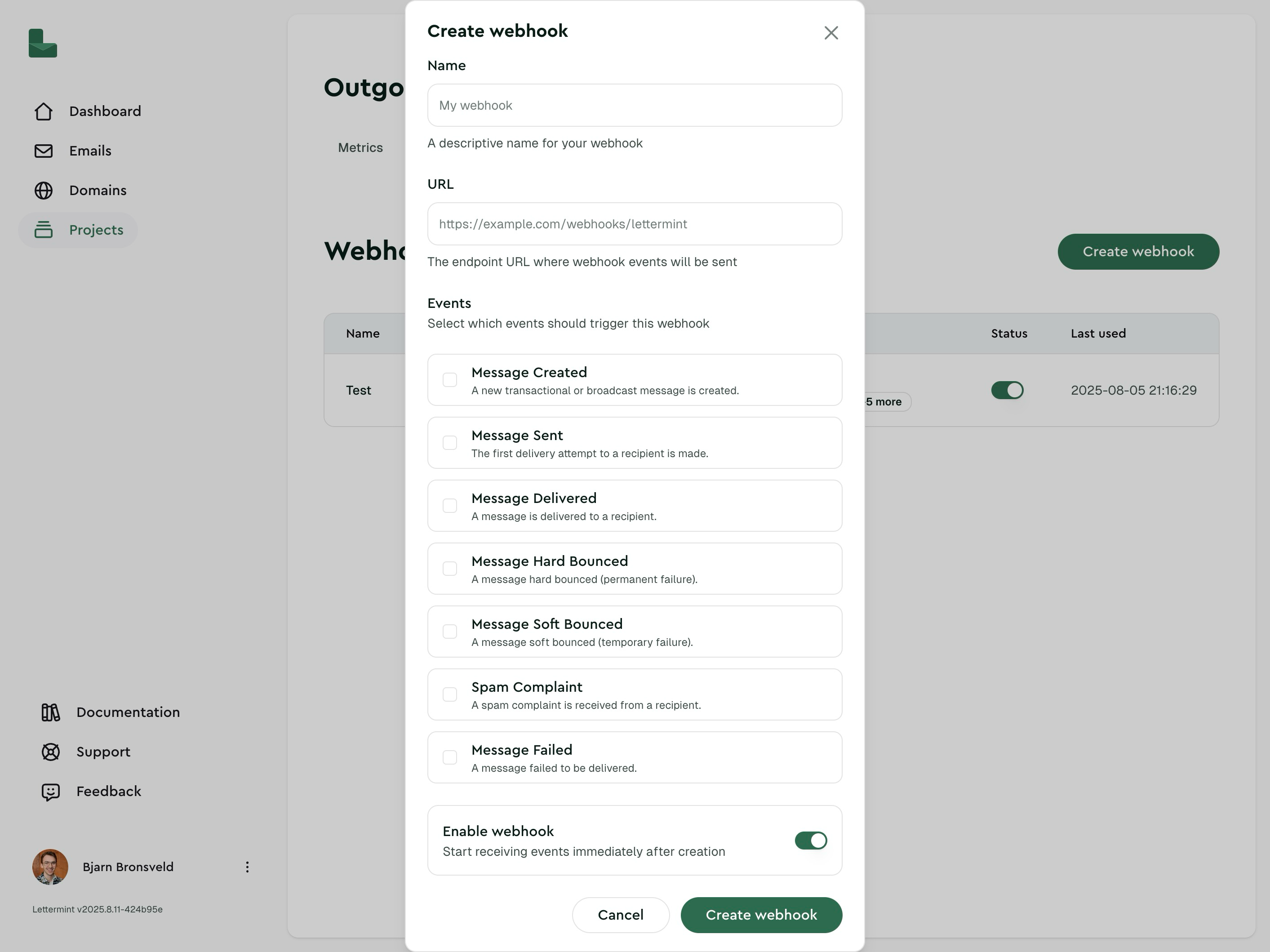 3. Enter your webhook details:
- **Name:** e.g., "Production Events"
- **URL:** your HTTPS endpoint (e.g., `https://api.example.com/webhooks/lettermint`)
- **Events:** select the event types you want to receive
- **Include machine events:** off by default; enable only if you want bot, privacy proxy, and scanner tracking observations
- **Enabled:** keep on to start receiving events
4. Save. Your webhook is now active.
3. Enter your webhook details:
- **Name:** e.g., "Production Events"
- **URL:** your HTTPS endpoint (e.g., `https://api.example.com/webhooks/lettermint`)
- **Events:** select the event types you want to receive
- **Include machine events:** off by default; enable only if you want bot, privacy proxy, and scanner tracking observations
- **Enabled:** keep on to start receiving events
4. Save. Your webhook is now active.
 ### 2. Send a test delivery
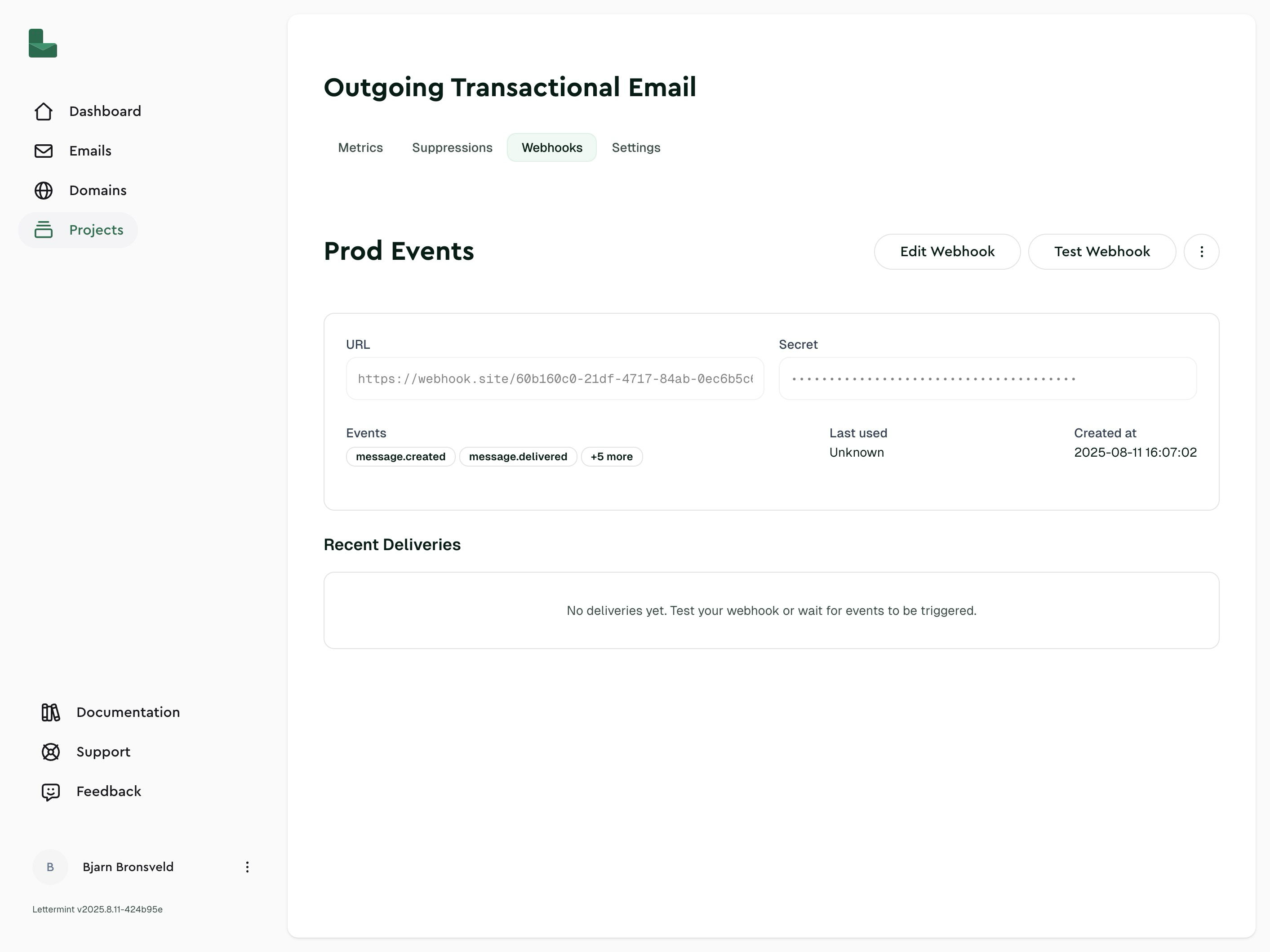
From the webhook details page, click **Test Webhook**. You should receive a payload like this:
```json
{
"id": "test-7f9c8e2a-1b3d-4f6e-b7d2-5c9f3a7e8b0c",
"event": "webhook.test",
"timestamp": "2025-08-08T20:14:12.000Z",
"data": {
"message": "This is a test webhook from Lettermint",
"webhook_id": "9f9bf19c-4a2c-45f3-a6c7-bc937224ec5a",
"timestamp": 1754921294
}
}
```
:::info
Webhooks are scoped to a specific **Route** within a Project. This lets you subscribe to events for different Routes independently. For example, bounces from your newsletter Route won't trigger webhooks configured on your transactional Route.
:::
## Implementing a webhook endpoint
Here's a minimal endpoint that receives webhooks:
```javascript title="Express"
const express = require('express')
const app = express()
app.use(express.json())
app.post('/webhooks/lettermint', (req, res) => {
const event = req.body
// TODO: Verify signature in production!
// See: https://docs.lettermint.co/platform/webhooks/signing
console.log('Received:', event.event, event.id)
// Return 200 quickly - do heavy processing async
res.status(200).json({ received: true })
})
app.listen(3000)
```
```typescript title="Next.js"
// app/api/webhooks/lettermint/route.ts
import { NextResponse } from 'next/server'
export async function POST(req: Request) {
const event = await req.json()
// TODO: Verify signature in production!
// See: https://docs.lettermint.co/platform/webhooks/signing
console.log('Received:', event.event, event.id)
return NextResponse.json({ received: true })
}
```
:::warning
**Always verify webhook signatures in production.** Without verification, anyone who discovers your endpoint URL can send fake events. See [Signed webhooks](/platform/webhooks/signing) for implementation examples.
:::
### Best practices
**Return 200 quickly**
Do heavy processing asynchronously. If your endpoint takes too long or returns an error, we'll retry the delivery.
**Implement idempotency**
Use the `event.id` field to detect duplicate deliveries and prevent processing the same event twice:
```javascript
app.post('/webhooks/lettermint', async (req, res) => {
const event = req.body
// Check if we've already processed this event
const alreadyProcessed = await db.webhookEvents.findUnique({
where: { eventId: event.id }
})
if (alreadyProcessed) {
return res.status(200).json({ received: true }) // Still return 200
}
// Process the event
await handleEvent(event)
// Mark as processed
await db.webhookEvents.create({ data: { eventId: event.id } })
res.status(200).json({ received: true })
})
```
:::tip
Use the **Test Webhook** button in the dashboard to verify your endpoint is working before sending real emails.
:::
## HTTP headers
Every webhook delivery includes these headers:
| Header | Description |
|--------|-------------|
| `X-Lettermint-Signature` | HMAC-SHA256 signature for verification |
| `X-Lettermint-Event` | Event type (e.g., `message.delivered`) |
| `X-Lettermint-Delivery` | Delivery timestamp (Unix seconds) |
| `X-Lettermint-Attempt` | Retry attempt number (1, 2, 3...) |
See [Signed webhooks](/platform/webhooks/signing) for details on verifying the signature.
## Webhook fields
| Field | Description |
|-------|-------------|
| **Name** | Display name for your webhook |
| **URL** | HTTPS endpoint we POST to |
| **Events** | Array of [event types](/platform/webhooks/events) to receive |
| **Include machine events** | Whether `message.opened` and `message.clicked` webhooks should include bot, privacy proxy, and scanner observations. Disabled by default. |
| **Enabled** | Whether the webhook is active |
| **Secret** | HMAC secret for signature verification (rotatable) |
| **Deliveries** | Recent delivery attempts with status, response, and timing |
:::tip
Create multiple webhooks per Route to isolate consumers (e.g., one for analytics, another for billing).
:::
## Delivery and retries
We retry failed webhook deliveries with exponential backoff. A delivery fails if your endpoint returns a non-2xx status or times out (30 seconds).
**Retry schedule (12 total attempts: 1 initial attempt + 11 automatic retries):**
| Attempt | Delay after previous |
|---------|---------------------|
| 1 | Immediate |
| 2 | 1 minute |
| 3 | 2 minutes |
| 4 | 5 minutes |
| 5 | 10 minutes |
| 6 | 10 minutes |
| 7 | 15 minutes |
| 8 | 30 minutes |
| 9 | 1 hour |
| 10 | 2 hours |
| 11 | 4 hours |
| 12 | 6 hours |
This schedule spans roughly 14 hours from the initial delivery attempt to the final automatic retry.
After all retries are exhausted, the delivery is marked as failed. You can see all delivery attempts in the dashboard by clicking on your webhook.
## Troubleshooting
### Webhook is disabled
**Problem:** No events are being delivered
**Solution:** Check that the webhook's **Enabled** toggle is on. Disabled webhooks won't send any deliveries.
### No deliveries appear
**Problem:** Expected events aren't showing up
**Solutions:**
- Use the **Test Webhook** button to verify your endpoint is reachable
- Confirm your endpoint returns a 2xx status code
- Check your server logs for incoming requests
- Verify the Route has the webhook enabled and configured for the right events
### Repeated retries
**Problem:** The same event keeps being retried
**Solutions:**
- Your endpoint must return 200-299 status quickly (within 30 seconds)
- Move heavy processing to a background job and return 200 immediately
- Implement idempotency using `event.id` to handle duplicate deliveries gracefully
### Connection refused or timeout
**Problem:** Deliveries fail with connection errors
**Solutions:**
- Ensure your endpoint is publicly accessible (not localhost)
- Check firewall rules allow incoming HTTPS connections
- Verify SSL/TLS certificate is valid and not expired
- For local development, use a tunnel like [ngrok](https://ngrok.com)
### Signature verification fails
**Problem:** All webhooks are rejected as invalid
**Solution:** See the troubleshooting section in [Signed webhooks](/platform/webhooks/signing#troubleshooting).
## Next steps
- **[Signed webhooks](/platform/webhooks/signing):** Verify webhook authenticity (required for production)
- **[Webhook events](/platform/webhooks/events):** See all available event types and their payloads
### 2. Send a test delivery
From the webhook details page, click **Test Webhook**. You should receive a payload like this:
```json
{
"id": "test-7f9c8e2a-1b3d-4f6e-b7d2-5c9f3a7e8b0c",
"event": "webhook.test",
"timestamp": "2025-08-08T20:14:12.000Z",
"data": {
"message": "This is a test webhook from Lettermint",
"webhook_id": "9f9bf19c-4a2c-45f3-a6c7-bc937224ec5a",
"timestamp": 1754921294
}
}
```
:::info
Webhooks are scoped to a specific **Route** within a Project. This lets you subscribe to events for different Routes independently. For example, bounces from your newsletter Route won't trigger webhooks configured on your transactional Route.
:::
## Implementing a webhook endpoint
Here's a minimal endpoint that receives webhooks:
```javascript title="Express"
const express = require('express')
const app = express()
app.use(express.json())
app.post('/webhooks/lettermint', (req, res) => {
const event = req.body
// TODO: Verify signature in production!
// See: https://docs.lettermint.co/platform/webhooks/signing
console.log('Received:', event.event, event.id)
// Return 200 quickly - do heavy processing async
res.status(200).json({ received: true })
})
app.listen(3000)
```
```typescript title="Next.js"
// app/api/webhooks/lettermint/route.ts
import { NextResponse } from 'next/server'
export async function POST(req: Request) {
const event = await req.json()
// TODO: Verify signature in production!
// See: https://docs.lettermint.co/platform/webhooks/signing
console.log('Received:', event.event, event.id)
return NextResponse.json({ received: true })
}
```
:::warning
**Always verify webhook signatures in production.** Without verification, anyone who discovers your endpoint URL can send fake events. See [Signed webhooks](/platform/webhooks/signing) for implementation examples.
:::
### Best practices
**Return 200 quickly**
Do heavy processing asynchronously. If your endpoint takes too long or returns an error, we'll retry the delivery.
**Implement idempotency**
Use the `event.id` field to detect duplicate deliveries and prevent processing the same event twice:
```javascript
app.post('/webhooks/lettermint', async (req, res) => {
const event = req.body
// Check if we've already processed this event
const alreadyProcessed = await db.webhookEvents.findUnique({
where: { eventId: event.id }
})
if (alreadyProcessed) {
return res.status(200).json({ received: true }) // Still return 200
}
// Process the event
await handleEvent(event)
// Mark as processed
await db.webhookEvents.create({ data: { eventId: event.id } })
res.status(200).json({ received: true })
})
```
:::tip
Use the **Test Webhook** button in the dashboard to verify your endpoint is working before sending real emails.
:::
## HTTP headers
Every webhook delivery includes these headers:
| Header | Description |
|--------|-------------|
| `X-Lettermint-Signature` | HMAC-SHA256 signature for verification |
| `X-Lettermint-Event` | Event type (e.g., `message.delivered`) |
| `X-Lettermint-Delivery` | Delivery timestamp (Unix seconds) |
| `X-Lettermint-Attempt` | Retry attempt number (1, 2, 3...) |
See [Signed webhooks](/platform/webhooks/signing) for details on verifying the signature.
## Webhook fields
| Field | Description |
|-------|-------------|
| **Name** | Display name for your webhook |
| **URL** | HTTPS endpoint we POST to |
| **Events** | Array of [event types](/platform/webhooks/events) to receive |
| **Include machine events** | Whether `message.opened` and `message.clicked` webhooks should include bot, privacy proxy, and scanner observations. Disabled by default. |
| **Enabled** | Whether the webhook is active |
| **Secret** | HMAC secret for signature verification (rotatable) |
| **Deliveries** | Recent delivery attempts with status, response, and timing |
:::tip
Create multiple webhooks per Route to isolate consumers (e.g., one for analytics, another for billing).
:::
## Delivery and retries
We retry failed webhook deliveries with exponential backoff. A delivery fails if your endpoint returns a non-2xx status or times out (30 seconds).
**Retry schedule (12 total attempts: 1 initial attempt + 11 automatic retries):**
| Attempt | Delay after previous |
|---------|---------------------|
| 1 | Immediate |
| 2 | 1 minute |
| 3 | 2 minutes |
| 4 | 5 minutes |
| 5 | 10 minutes |
| 6 | 10 minutes |
| 7 | 15 minutes |
| 8 | 30 minutes |
| 9 | 1 hour |
| 10 | 2 hours |
| 11 | 4 hours |
| 12 | 6 hours |
This schedule spans roughly 14 hours from the initial delivery attempt to the final automatic retry.
After all retries are exhausted, the delivery is marked as failed. You can see all delivery attempts in the dashboard by clicking on your webhook.
## Troubleshooting
### Webhook is disabled
**Problem:** No events are being delivered
**Solution:** Check that the webhook's **Enabled** toggle is on. Disabled webhooks won't send any deliveries.
### No deliveries appear
**Problem:** Expected events aren't showing up
**Solutions:**
- Use the **Test Webhook** button to verify your endpoint is reachable
- Confirm your endpoint returns a 2xx status code
- Check your server logs for incoming requests
- Verify the Route has the webhook enabled and configured for the right events
### Repeated retries
**Problem:** The same event keeps being retried
**Solutions:**
- Your endpoint must return 200-299 status quickly (within 30 seconds)
- Move heavy processing to a background job and return 200 immediately
- Implement idempotency using `event.id` to handle duplicate deliveries gracefully
### Connection refused or timeout
**Problem:** Deliveries fail with connection errors
**Solutions:**
- Ensure your endpoint is publicly accessible (not localhost)
- Check firewall rules allow incoming HTTPS connections
- Verify SSL/TLS certificate is valid and not expired
- For local development, use a tunnel like [ngrok](https://ngrok.com)
### Signature verification fails
**Problem:** All webhooks are rejected as invalid
**Solution:** See the troubleshooting section in [Signed webhooks](/platform/webhooks/signing#troubleshooting).
## Next steps
- **[Signed webhooks](/platform/webhooks/signing):** Verify webhook authenticity (required for production)
- **[Webhook events](/platform/webhooks/events):** See all available event types and their payloads