# Tags
## What are tags?
Tags are labels you can attach to emails to organize and categorize them. They help you:
- **Track campaigns**: Group emails by marketing campaigns or newsletters
- **Organize by department**: Separate transactional emails by department (billing, support, etc.)
- **Filter messages**: Quickly find specific types of emails in your dashboard
- **Analyze performance**: Compare metrics across different email categories
## Adding tags to emails
### Via API
Add a `tag` field to your API request:
```ts title="Node.js"
await lettermint.email
.from('John Doe ')
.to('recipient@example.com')
.subject('Welcome to our newsletter')
.text('Thank you for subscribing!')
.tag('newsletter')
.send();
```
```php title="PHP"
$lettermint->email
->from('John Doe ')
->to('recipient@example.com')
->subject('Welcome to our newsletter')
->text('Thank you for subscribing!')
->tag('newsletter')
->send();
```
```python title="Python"
import lettermint
lettermint.email(
from_="John Doe ",
to=["recipient@example.com"],
subject="Welcome to our newsletter",
text="Thank you for subscribing!",
tag="newsletter"
).send()
```
```bash title="cURL"
curl -X POST https://api.lettermint.co/v1/send \
-H "x-lettermint-token: $TOKEN" \
-H "Content-Type: application/json" \
-d '{
"from": "John Doe ",
"to": ["recipient@example.com"],
"subject": "Welcome to our newsletter",
"text": "Thank you for subscribing!",
"tag": "newsletter"
}'
```
### Via SMTP
When using SMTP, add the `X-LM-Tag` header to your email:
```ts title="Node.js (Nodemailer)"
await transporter.sendMail({
from: 'sender@yourdomain.com',
to: 'recipient@example.com',
subject: 'Order Confirmation',
text: 'Your order has been confirmed.',
headers: {
'X-LM-Tag': 'order-confirmation'
}
});
```
```php title="PHP (PHPMailer)"
$mail->addCustomHeader('X-LM-Tag', 'order-confirmation');
```
```python title="Python (smtplib)"
msg['X-LM-Tag'] = 'order-confirmation'
```
## Tag format requirements
| Constraint | Value |
|------------|-------|
| Max length | 255 characters |
| Allowed characters | `a-z`, `A-Z`, `0-9`, `_`, `-`, space |
| Pattern | `^[a-zA-Z0-9_-]+(?:\s[a-zA-Z0-9_-]+)*$` |
:::info
Spaces are allowed between words but not at the beginning or end of a tag.
:::
**Valid examples:** `newsletter`, `order-confirmation`, `Order Confirmation`, `invoice_2024`
**Invalid examples:** ` Newsletter` (leading space), `invoice@2024` (@ not allowed), `order.confirmation` (. not allowed)
## Naming conventions
Use consistent patterns to keep tags organized and machine-readable:
- **Use prefixes by category:** `billing-invoice`, `support-ticket`, `marketing-promo`
- **Include dates for campaigns:** `newsletter-2025-01`, `black-friday-2024`
- **Keep tags lowercase:** Makes filtering and analytics queries simpler
## Filtering messages
### Filter by specific tag
Retrieve all messages with a specific tag:
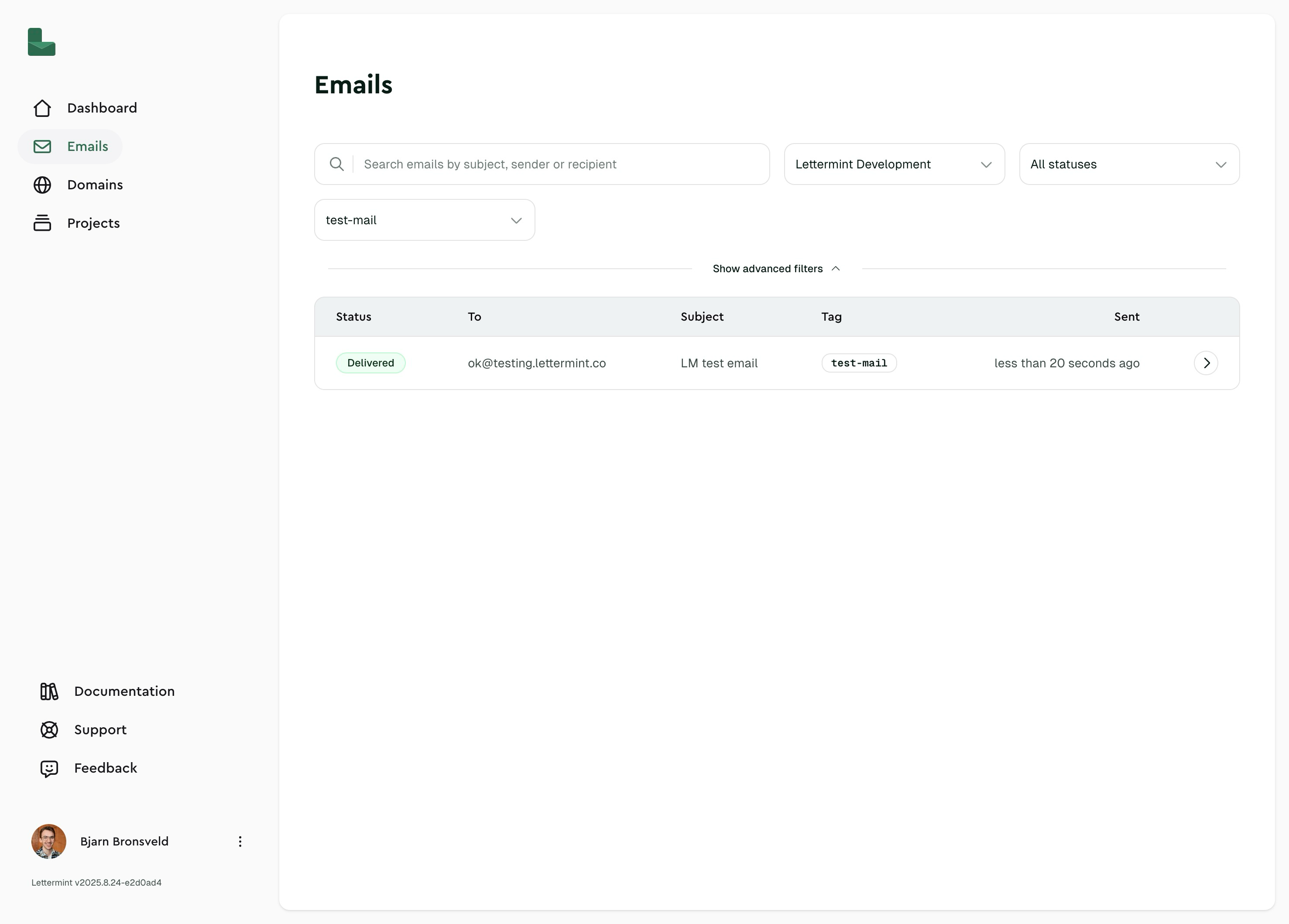 ### Team isolation
Tags are isolated to your team:
- Each team has its own set of tags
- Tags with the same name can exist across different teams
- Switching teams shows only that team's tags
:::tip
Tags are created automatically when you first use them. There's no need to pre-create tags before sending emails.
:::
:::tip
Tags are included in [webhook event payloads](/platform/webhooks/events) for all message events. Use them to correlate webhook data with your systems.
:::
## Limitations
- **One tag per message**: Each email can have only one tag
- **No tag updates**: Once an email is sent, its tag cannot be changed
- **Automatic cleanup**: Unused tags (with no associated messages) may be removed during message cleanup
## Related
- [Webhook events](/platform/webhooks/events) — Tags are included in all message event payloads
- Metadata — Attach custom key-value data to messages
### Team isolation
Tags are isolated to your team:
- Each team has its own set of tags
- Tags with the same name can exist across different teams
- Switching teams shows only that team's tags
:::tip
Tags are created automatically when you first use them. There's no need to pre-create tags before sending emails.
:::
:::tip
Tags are included in [webhook event payloads](/platform/webhooks/events) for all message events. Use them to correlate webhook data with your systems.
:::
## Limitations
- **One tag per message**: Each email can have only one tag
- **No tag updates**: Once an email is sent, its tag cannot be changed
- **Automatic cleanup**: Unused tags (with no associated messages) may be removed during message cleanup
## Related
- [Webhook events](/platform/webhooks/events) — Tags are included in all message event payloads
- Metadata — Attach custom key-value data to messages