# Project Limits
By default, all verified domains are available to every project within your team. Project limits allow you to restrict a domain so that only specific projects can send emails from it.
## When to Use Project Limits
Project limits are useful when you need to enforce boundaries between different parts of your organization:
| Use Case | Example |
|----------|---------|
| **Multi-brand separation** | Restrict `mail.brand-a.com` to only the Brand A project |
| **Environment isolation** | Prevent staging projects from accidentally using production domains |
| **Security boundaries** | Limit sensitive domains to specific applications |
:::info
If all your projects share the same domains, you don't need to configure project limits—the default unrestricted behavior works well for most teams.
:::
## How It Works
Domains can be in one of two states:
| State | Description |
|-------|-------------|
| **Unrestricted** | Domain can be used by any project in your team (default) |
| **Restricted** | Domain can only be used by explicitly selected projects |
When a project attempts to send an email using a restricted domain it doesn't have access to, the API returns an error:
```json
{
"message": "The domain 'mail.acme.com' is not available for use by this project."
}
```
## Configuring Project Limits
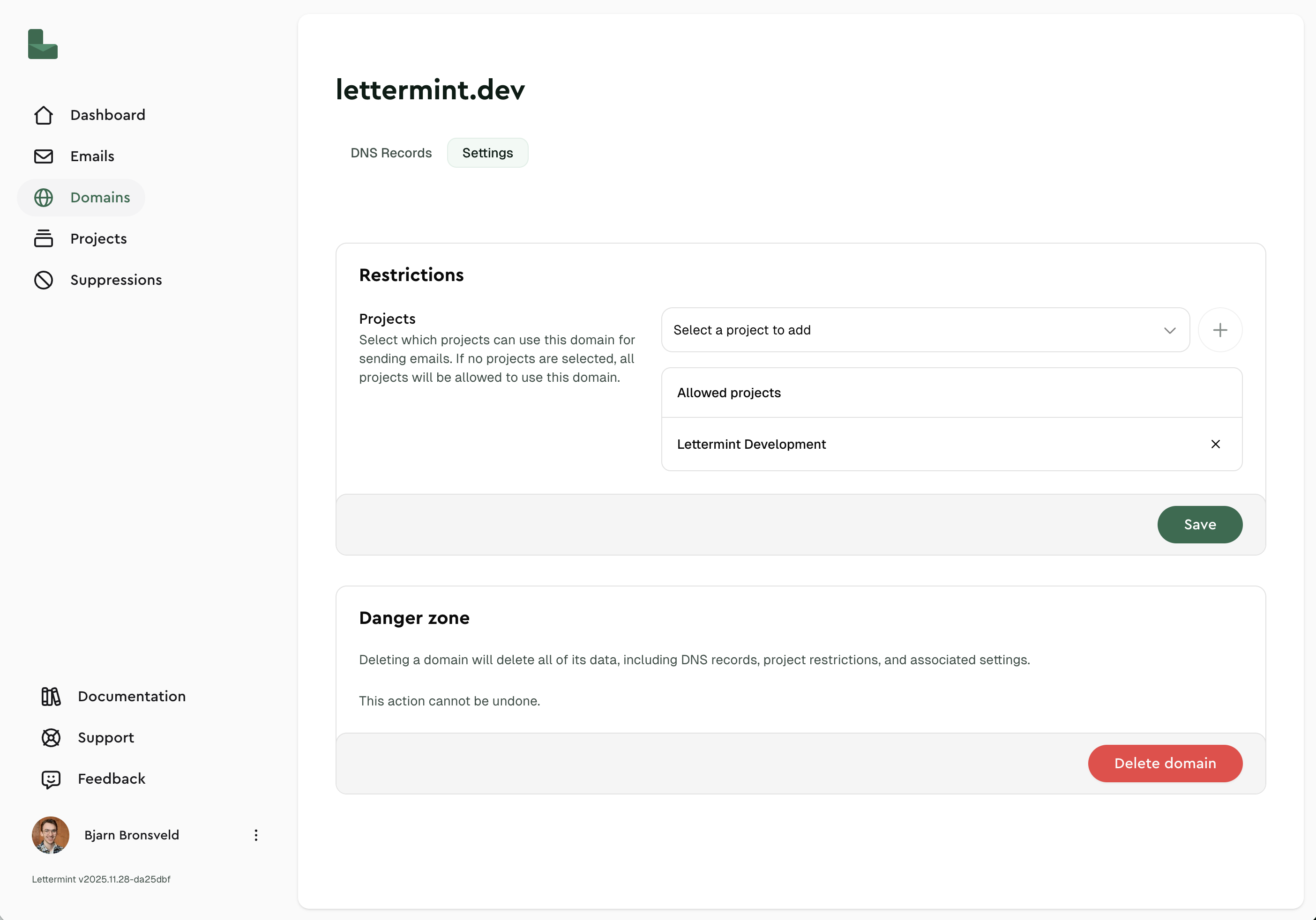
You can configure which projects have access to a domain from the domain settings page.
### Restricting a Domain
1. Navigate to [Domains](https://dash.lettermint.co/domains) in your dashboard
2. Click on the domain you want to restrict
3. In the project limits section, select the projects that should have access
4. Save your changes
### Removing Restrictions
To make a domain available to all projects again, simply remove all project selections. An empty selection means the domain is unrestricted and available to all projects in your team.
## Managing via API
You can manage project limits programmatically using the [Team API](/platform/teams/team-api/introduction).
### Restrict a Domain to Specific Projects
```bash title="cURL"
curl -X PUT "https://api.lettermint.co/v1/domains/{domainId}/projects" \
-H "Accept: application/json" \
-H "Authorization: Bearer YOUR_TEAM_TOKEN" \
-H "Content-Type: application/json" \
-d '{
"project_ids": ["project-uuid-1", "project-uuid-2"]
}'
```
```javascript title="Node.js"
const response = await fetch(
`https://api.lettermint.co/v1/domains/${domainId}/projects`,
{
method: 'PUT',
headers: {
'Accept': 'application/json',
'Authorization': 'Bearer YOUR_TEAM_TOKEN',
'Content-Type': 'application/json'
},
body: JSON.stringify({
project_ids: ['project-uuid-1', 'project-uuid-2']
})
}
);
const domain = await response.json();
```
```php title="PHP"
"https://api.lettermint.co/v1/domains/{$domainId}/projects",
CURLOPT_RETURNTRANSFER => true,
CURLOPT_CUSTOMREQUEST => 'PUT',
CURLOPT_HTTPHEADER => [
'Accept: application/json',
'Authorization: Bearer YOUR_TEAM_TOKEN',
'Content-Type: application/json'
],
CURLOPT_POSTFIELDS => json_encode([
'project_ids' => ['project-uuid-1', 'project-uuid-2']
])
]);
$response = curl_exec($curl);
curl_close($curl);
```
### Remove All Restrictions
Pass an empty array to make the domain available to all projects:
```bash title="cURL"
curl -X PUT "https://api.lettermint.co/v1/domains/{domainId}/projects" \
-H "Accept: application/json" \
-H "Authorization: Bearer YOUR_TEAM_TOKEN" \
-H "Content-Type: application/json" \
-d '{
"project_ids": []
}'
```
```javascript title="Node.js"
const response = await fetch(
`https://api.lettermint.co/v1/domains/${domainId}/projects`,
{
method: 'PUT',
headers: {
'Accept': 'application/json',
'Authorization': 'Bearer YOUR_TEAM_TOKEN',
'Content-Type': 'application/json'
},
body: JSON.stringify({
project_ids: []
})
}
);
```
```php title="PHP"
"https://api.lettermint.co/v1/domains/{$domainId}/projects",
CURLOPT_RETURNTRANSFER => true,
CURLOPT_CUSTOMREQUEST => 'PUT',
CURLOPT_HTTPHEADER => [
'Accept: application/json',
'Authorization: Bearer YOUR_TEAM_TOKEN',
'Content-Type: application/json'
],
CURLOPT_POSTFIELDS => json_encode([
'project_ids' => []
])
]);
$response = curl_exec($curl);
curl_close($curl);
```
**Success Response:**
```json
{
"data": {
"id": "domain-uuid",
"domain": "mail.acme.com",
"verified_at": "2024-01-15T10:30:00.000Z"
},
"message": "Domain projects updated successfully."
}
```
See the [Update Domain Projects](/api-reference/team/domain/update-projects-associated-with-a-domain) endpoint for the full API reference.
## Access Control
When a domain is restricted to specific projects, it affects who can manage the domain:
| Role | Can Edit Domain? |
|------|------------------|
| **Team Owner** | Always |
| **Team Member** | Only if they have access to at least one of the restricted projects |
:::warning
Team members who don't have access to any of the restricted projects will see the domain in the list but cannot modify its settings.
:::
## Troubleshooting
Why can't I edit this domain?
The domain is restricted to projects you don't have access to. Contact your team owner to either:
- Grant you access to one of the restricted projects, or
- Add a project you have access to in the domain's project limits
How do I make a domain available to all projects again?
Remove all project selections in the dashboard, or via API, set `project_ids` to an empty array `[]`.
Can I restrict a domain to zero projects?
No. An empty project list means the domain is **unrestricted** and available to all projects. To completely disable a domain, you would need to delete it instead.
## Related
- [Projects and Routes](/platform/projects-and-routes/introduction) — Understand the team → project → route hierarchy
- [Team API Introduction](/platform/teams/team-api/introduction) — Manage team resources programmatically