# Introduction
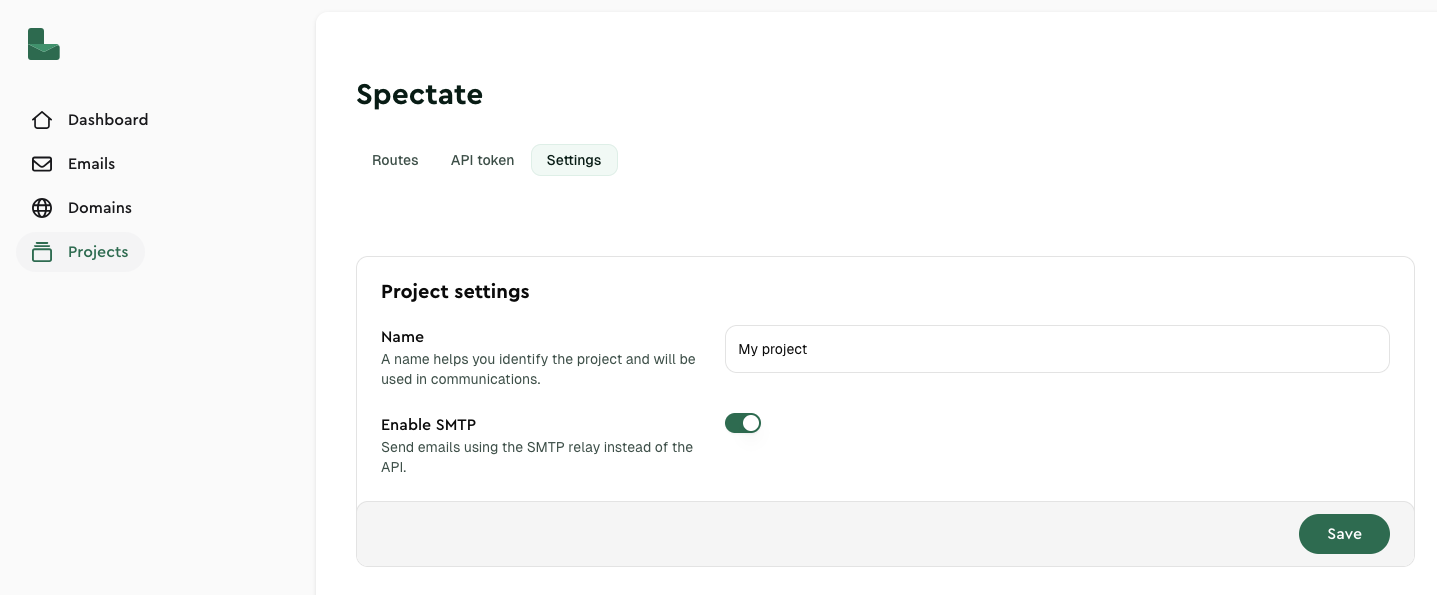
## Enable SMTP
First, enable SMTP for the project you want to use. You can find this setting under your [Projects](https://dash.lettermint.co/projects).
 :::tip
If you want more information about SMTP, read our ['What is SMTP' article](https://lettermint.co/knowledge-base/definitions/what-is-smtp).
:::
## SMTP Configuration
Use these settings to configure your application or email client:
| Setting | Value |
|--------------------|--------------------------------------------------|
| **Host** | `smtp.lettermint.co` |
| **Port** | `587` (see [available ports](#available-ports) ) |
| **Authentication** | `PLAIN`, `LOGIN` and `CRAM-MD5` are supported |
| **Username** | `lettermint` |
| **Password** | Your Lettermint API token |
## Available ports
Lettermint supports multiple SMTP ports to accommodate different network environments and security requirements:
| Port | Security | Notes |
|----------|-------------------------------------------------|-------------------------------------------------------------|
| **25** | STARTTLS (optional encryption upgrade) | Not recommended, blocked by many ISPs and cloud providers |
| **587** | STARTTLS (encryption upgrade) | Recommended as alternative if Implicit TLS is not supported |
| **465** | Implicit TLS (SMTPS, encrypted from connection) | **Recommended** for best security |
| **2525** | STARTTLS (encryption upgrade) | Alternative to port 25 |
| **2465** | STARTTLS (encryption upgrade) | Alternative to port 465 |
| **2587** | STARTTLS (encryption upgrade) | Alternative to port 587 |
### Understanding TLS Options
- **STARTTLS**: Connection starts unencrypted and upgrades to TLS encryption. Used on ports 25, 587, 2525, 2465 and 2587.
- **SMTPS**: Connection is encrypted from the start. Used on port 465.
:::tip
If you're not sure which port to use, start with port 587. It's widely accepted and provides good security through STARTTLS.
:::
:::warning
Port 25 is often blocked by ISPs and cloud providers to prevent spam. We recommend using alternative ports whenever possible.
:::
## Authentication
Authentication is always required when using Lettermint's SMTP service:
1. Use `lettermint` as username and your API token as password
2. Always use TLS encryption (either STARTTLS or Implicit TLS) to protect your credentials
3. Your API token can be found in your dashboard under API settings
:::tip
Store your API token in an environment variable (e.g., `LETTERMINT_PROJECT_TOKEN`) rather than hardcoding it in your application code.
:::
## Custom Headers
### X-Lettermint-Route
You can control email routing by including the `X-Lettermint-Route` header in your SMTP messages. This header accepts a route's slug to specify which route should handle the email.
```
X-Lettermint-Route: your-route-slug
```
This is useful when you have multiple routes configured in your project and want to explicitly specify which route should process a particular email. If this header is not provided, the email will be routed according to your project's default route, which is always the original outgoing transactional route.
### X-LM-Tag (or X-Tag)
Tag your emails for organization, filtering, and analytics by including the `X-LM-Tag` header. Tags help you categorize emails by campaign, department, or any custom classification.
```
X-LM-Tag: order-confirmation
```
**Tag requirements:**
- Maximum length: 255 characters
- Allowed characters: Letters, numbers, underscores, hyphens, and spaces
- Pattern: `^[a-zA-Z0-9_-]+(?:\s[a-zA-Z0-9_-]+)*$`
- One tag per message
**Valid examples:**
- `newsletter`
- `order-confirmation`
- `Password Reset`
- `Invoice_2024`
**Alternative header:** You can also use `X-Tag` for compatibility with Symfony Mailer, but `X-LM-Tag` takes precedence if both are present.
:::tip
Learn more about organizing emails with tags in the [Tags documentation](/platform/emails/tags).
:::
### X-LM-Metadata-* (or X-Metadata-*)
Attach custom metadata to your emails for tracking and webhook payloads. Metadata headers use a prefix pattern where anything after `X-LM-Metadata-` becomes the metadata key.
```
X-LM-Metadata-order_id: 12345
X-LM-Metadata-customer_id: cust_789
X-LM-Metadata-campaign: summer-sale
```
**Key features:**
- Keys preserve their casing (e.g., `X-LM-Metadata-UserID` → `{"UserID": "value"}`)
- Values are stored as strings
- Metadata is included in webhook payloads but not sent to recipients
- Useful for correlating emails with your application data
**Alternative prefix:** You can also use `X-Metadata-` for compatibility with Symfony Mailer, but `X-LM-Metadata-` takes precedence if both are present for the same key.
## Rate limits
SMTP relay follows the same rate limits as our API: no rate limit at all!
## Testing Your Configuration
Test your SMTP setup with a simple command-line tool:
```bash
# Install swaks (SMTP testing tool)
# On macOS: brew install swaks
# On Ubuntu: apt-get install swaks
swaks --to recipient@example.com \
--from sender@yourdomain.com \
--server smtp.lettermint.co:587 \
--auth LOGIN \
--auth-user lettermint \
--auth-password your-api-key \
--tls \
--header "Subject: SMTP Test" \
--header "X-Lettermint-Route: your-route-slug" \
--header "X-LM-Tag: test-email" \
--header "X-LM-Metadata-source: swaks-test" \
--body "This is a test email via SMTP."
```
:::note
For language-specific examples and application configurations, please refer to our dedicated guides in the documentation.
:::
:::tip
If you want more information about SMTP, read our ['What is SMTP' article](https://lettermint.co/knowledge-base/definitions/what-is-smtp).
:::
## SMTP Configuration
Use these settings to configure your application or email client:
| Setting | Value |
|--------------------|--------------------------------------------------|
| **Host** | `smtp.lettermint.co` |
| **Port** | `587` (see [available ports](#available-ports) ) |
| **Authentication** | `PLAIN`, `LOGIN` and `CRAM-MD5` are supported |
| **Username** | `lettermint` |
| **Password** | Your Lettermint API token |
## Available ports
Lettermint supports multiple SMTP ports to accommodate different network environments and security requirements:
| Port | Security | Notes |
|----------|-------------------------------------------------|-------------------------------------------------------------|
| **25** | STARTTLS (optional encryption upgrade) | Not recommended, blocked by many ISPs and cloud providers |
| **587** | STARTTLS (encryption upgrade) | Recommended as alternative if Implicit TLS is not supported |
| **465** | Implicit TLS (SMTPS, encrypted from connection) | **Recommended** for best security |
| **2525** | STARTTLS (encryption upgrade) | Alternative to port 25 |
| **2465** | STARTTLS (encryption upgrade) | Alternative to port 465 |
| **2587** | STARTTLS (encryption upgrade) | Alternative to port 587 |
### Understanding TLS Options
- **STARTTLS**: Connection starts unencrypted and upgrades to TLS encryption. Used on ports 25, 587, 2525, 2465 and 2587.
- **SMTPS**: Connection is encrypted from the start. Used on port 465.
:::tip
If you're not sure which port to use, start with port 587. It's widely accepted and provides good security through STARTTLS.
:::
:::warning
Port 25 is often blocked by ISPs and cloud providers to prevent spam. We recommend using alternative ports whenever possible.
:::
## Authentication
Authentication is always required when using Lettermint's SMTP service:
1. Use `lettermint` as username and your API token as password
2. Always use TLS encryption (either STARTTLS or Implicit TLS) to protect your credentials
3. Your API token can be found in your dashboard under API settings
:::tip
Store your API token in an environment variable (e.g., `LETTERMINT_PROJECT_TOKEN`) rather than hardcoding it in your application code.
:::
## Custom Headers
### X-Lettermint-Route
You can control email routing by including the `X-Lettermint-Route` header in your SMTP messages. This header accepts a route's slug to specify which route should handle the email.
```
X-Lettermint-Route: your-route-slug
```
This is useful when you have multiple routes configured in your project and want to explicitly specify which route should process a particular email. If this header is not provided, the email will be routed according to your project's default route, which is always the original outgoing transactional route.
### X-LM-Tag (or X-Tag)
Tag your emails for organization, filtering, and analytics by including the `X-LM-Tag` header. Tags help you categorize emails by campaign, department, or any custom classification.
```
X-LM-Tag: order-confirmation
```
**Tag requirements:**
- Maximum length: 255 characters
- Allowed characters: Letters, numbers, underscores, hyphens, and spaces
- Pattern: `^[a-zA-Z0-9_-]+(?:\s[a-zA-Z0-9_-]+)*$`
- One tag per message
**Valid examples:**
- `newsletter`
- `order-confirmation`
- `Password Reset`
- `Invoice_2024`
**Alternative header:** You can also use `X-Tag` for compatibility with Symfony Mailer, but `X-LM-Tag` takes precedence if both are present.
:::tip
Learn more about organizing emails with tags in the [Tags documentation](/platform/emails/tags).
:::
### X-LM-Metadata-* (or X-Metadata-*)
Attach custom metadata to your emails for tracking and webhook payloads. Metadata headers use a prefix pattern where anything after `X-LM-Metadata-` becomes the metadata key.
```
X-LM-Metadata-order_id: 12345
X-LM-Metadata-customer_id: cust_789
X-LM-Metadata-campaign: summer-sale
```
**Key features:**
- Keys preserve their casing (e.g., `X-LM-Metadata-UserID` → `{"UserID": "value"}`)
- Values are stored as strings
- Metadata is included in webhook payloads but not sent to recipients
- Useful for correlating emails with your application data
**Alternative prefix:** You can also use `X-Metadata-` for compatibility with Symfony Mailer, but `X-LM-Metadata-` takes precedence if both are present for the same key.
## Rate limits
SMTP relay follows the same rate limits as our API: no rate limit at all!
## Testing Your Configuration
Test your SMTP setup with a simple command-line tool:
```bash
# Install swaks (SMTP testing tool)
# On macOS: brew install swaks
# On Ubuntu: apt-get install swaks
swaks --to recipient@example.com \
--from sender@yourdomain.com \
--server smtp.lettermint.co:587 \
--auth LOGIN \
--auth-user lettermint \
--auth-password your-api-key \
--tls \
--header "Subject: SMTP Test" \
--header "X-Lettermint-Route: your-route-slug" \
--header "X-LM-Tag: test-email" \
--header "X-LM-Metadata-source: swaks-test" \
--body "This is a test email via SMTP."
```
:::note
For language-specific examples and application configurations, please refer to our dedicated guides in the documentation.
:::